


Barco ClickShare for meeting rooms
One click and your content is on screen – a Teams, Zoom, Google Meet or Webex meeting starts in seconds. We install Barco ClickShare in all your rooms, connect it securely to the corporate network and manage it as one IT system.
- A Vodafone Group company
- 20 years in Lithuania
- Reply within 1 business day

 A Vodafone Group company, 20 years in Lithuania
What we install with Barco ClickShare
Wireless presentation
ClickShare Present (C-5, C-10) – content from a laptop, tablet or phone on screen with one click, without cables or adapters.
Hybrid meetings from your own laptop
ClickShare Conference (CX-20, CX-30, CX-50 Gen 2) – your laptop connects automatically to the room camera and audio. Works with Teams, Zoom, Google Meet and other platforms.
Video bars in one device
ClickShare Bar Core and Bar Pro – camera, microphones, speakers and wireless ClickShare in one housing for small and medium rooms.
Microsoft Teams Rooms
ClickShare Hub Core and Hub Pro – Microsoft Teams certified room kits with Sennheiser or Huddly video bars.
Secure network deployment
A separate network segment, security levels, software updates and alignment with your IT security policy.
Management and support
All rooms in one place – Barco XMS Cloud or Teams Rooms Pro Management: status, updates and room usage. We resolve issues remotely.
ClickShare for every room size
From a two-person huddle room to the boardroom: we will choose a solution based on whether you only need to share content or also join video meetings.
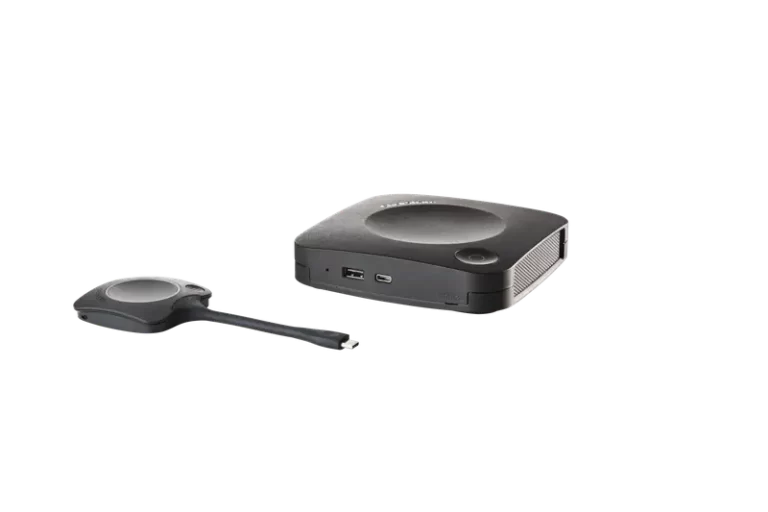
ClickShare Present: wireless presentation
When the room only needs content shared on screen.
• C-5 – for small rooms.
• C-10 – for medium and large rooms, with interactivity (touchback, annotation).
Content is shared with the ClickShare button or app – no cables.
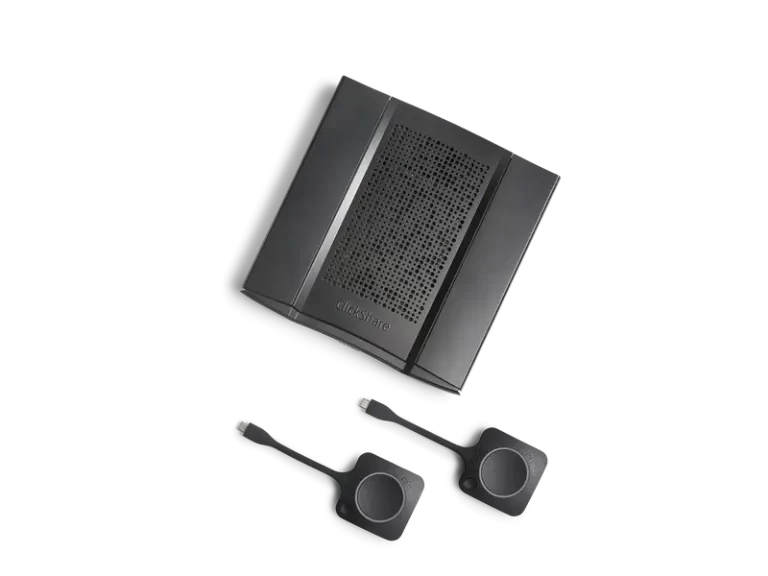
ClickShare Conference: meetings from your own laptop
Your laptop connects wirelessly to the room display, camera and audio – you start the meeting in your own Teams, Zoom or Google Meet.
• CX-20 – for small rooms.
• CX-30 – for medium rooms.
• CX-50 Gen 2 – for large rooms, with two displays.
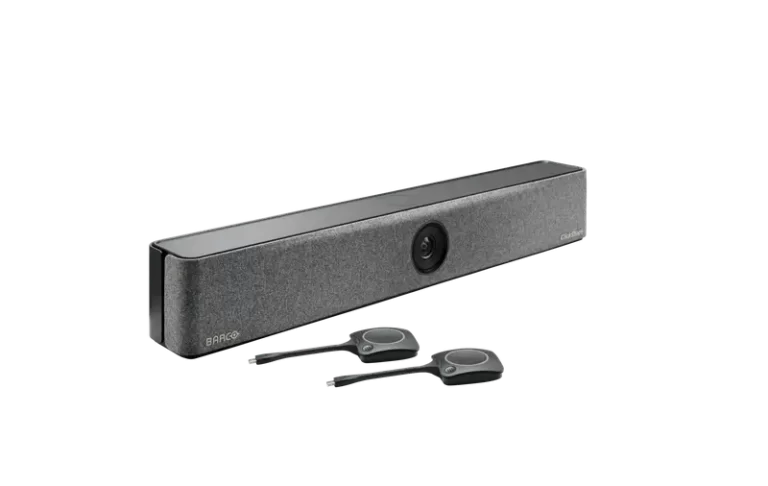
ClickShare Bar: video bar with ClickShare
Camera, microphones, speakers and ClickShare in one device.
• Bar Core – one display, one button.
• Bar Pro – two displays, two buttons, wired 4K input, speaker framing, annotation.
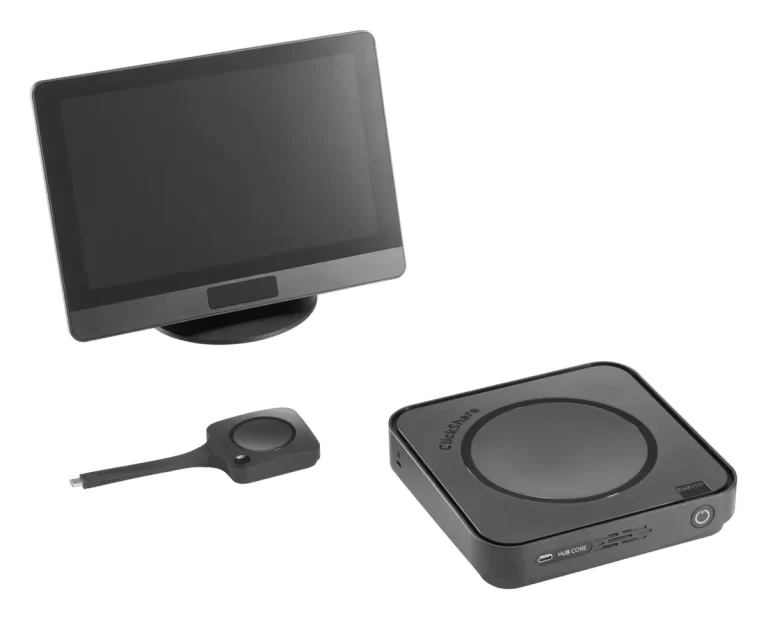
ClickShare Hub: Microsoft Teams Rooms
A room system for Microsoft Teams Rooms meetings, built on the Microsoft Device Ecosystem Platform.
• Hub Core – for small rooms, Hub Pro – for medium rooms.
• Microsoft Teams certified kits with Sennheiser TeamConnect Bar or Huddly C1.
• Guests share content with the next-generation button or a USB-C cable – no software to install.
Information based on Barco data. We confirm the exact model and quantity after assessing your rooms.
Compare ClickShare models
Choose a family or tick “Show differences only” – you will immediately see how the models differ.
Choose up to 3 models to compare:
| Feature | PresentClickShare C-5 | PresentClickShare C-10 | ConferenceClickShare CX-20 | ConferenceClickShare CX-30 | ConferenceClickShare CX-50 Gen 2 | BarClickShare Bar Core | BarClickShare Bar Pro | HubClickShare Hub Core | HubClickShare Hub Pro |
|---|---|---|---|---|---|---|---|---|---|
| Room | Small | Medium, large | Small | Medium | Large, boardroom | Small, medium | Medium | Small | Medium |
| Purpose | Content sharing | Content sharing | Meetings from your own laptop | Meetings from your own laptop | Meetings from your own laptop | Video bar with ClickShare | Video bar with ClickShare | Microsoft Teams Rooms | Microsoft Teams Rooms |
| Buttons included | – | 1 or 2 | 1 | 2 | 2 | 1 | 2 | 1 (next generation) | 2 (next generation) |
| Sources on screen at once | 1 | 2 | 1 | 2 | 2 | 1 | 2 | 1 | 1 |
| Interactivity (touchback, annotation) | – | ✓ | – | ✓ | ✓ | – | ✓ | ||
| Dual display | – | – | – | – | ✓ | – | ✓ | – | ✓ |
| Built-in camera and audio | – | – | – | – | – | ✓ | ✓ | Included with the video bar | Included with the video bar |
| Wired 4K input | – | – | – | – | ✓ | – | ✓ | USB-C | USB-C |
| Warranty | 1 yr, up to 5 yrs with SmartCare | 1 yr, up to 5 yrs with SmartCare | 1 yr, up to 5 yrs with SmartCare | 1 yr, up to 5 yrs with SmartCare | 1 yr, up to 5 yrs with SmartCare | 1 yr, up to 5 yrs with SmartCare | 1 yr, up to 5 yrs with SmartCare | 3 yrs | 3 yrs |
| Management | XMS Cloud | XMS Cloud | XMS Cloud | XMS Cloud | XMS Cloud | XMS Cloud | XMS Cloud | Teams Rooms Pro Management | Teams Rooms Pro Management |
Based on Barco data. An empty cell means the feature depends on the kit or is not specified by the manufacturer.
Barco ClickShare
In a large organisation the meeting room problem is not one broken cable – it is dozens of different rooms where every meeting starts with “how do I connect?”.
Barco ClickShare solves this: an employee or guest plugs a button into their laptop and shares content on screen with one click, or starts a Teams, Zoom, Google Meet or Webex meeting with the room camera and audio in seconds. No cables, adapters or training. More than 1.5 million ClickShare devices have been sold worldwide and they are used in over 130 countries.
Skaylink deploys ClickShare as IT, not as AV equipment: we assess your rooms and network, choose one standard for all offices, integrate securely with your corporate network and Microsoft 365, and after installation monitor and update all devices centrally.
Hardware, software and support – from one partner
A large organisation needs more than a box. For ClickShare to work in every office every day, three parts are needed – and we take care of all of them.
Hardware
The full ClickShare range – Present, Conference, Bar and Hub – plus displays, cameras and audio for the room.
• Chosen by room size and platform.
• One standard for all offices.
Software and services
The ClickShare app, Barco XMS Cloud management and SmartCare warranty of up to 5 years.
• Updates on your schedule.
• Room status and usage in one place.
Integration and support
Network, security, Microsoft 365 and Teams Rooms – the Skaylink IT team’s domain.
• Deployment in a separate network segment.
• Issue resolution remotely and on site.
Why ClickShare with Skaylink
Planning new offices or upgrading meeting rooms? We will assess your rooms and propose a solution for each room type.
An IT team, not just a hardware supplier
We manage both your network and Microsoft 365, so ClickShare works with your Wi-Fi, security rules and Teams from day one.
One standard for all offices
One solution for each room size. An employee walking into any room in Vilnius or Klaipėda knows what to do.
Security and NIS2
ClickShare processes are ISO/IEC 27001 certified and the solution helps meet NIS2 requirements. We will provide the security documentation to your security officer.
Try, upgrade, protect
Barco offers its partners programmes that reduce risk and the upfront investment. We will tell you which ones fit your project.
30-day trial
You can try ClickShare in your own room before buying – employees see how it works and IT assesses the integration.
Trade-in of old systems
When replacing old wireless presentation systems, the Barco trade-in programme lowers the price of new equipment.
SmartCare up to 5 years
Registering the device extends the warranty to up to 5 years, including fast hardware replacement and software updates.
Microsoft Teams certified kits
ClickShare Hub with Sennheiser or Huddly – pre-validated kits, so lower compatibility risk and faster deployment.
We agree programme terms for Lithuania with the Barco distributor.
How we install ClickShare
A clear process with no surprises: at every stage you know what is being done, who is responsible and when to expect results.
Room audit
We count and assess your rooms, displays, network and the meeting platforms you use.
Standard and pilot room
We choose a solution for each room size and set up one pilot room.
Deployment
We install all rooms and configure the network, security and central management.
Onboarding
We show employees and administrators how to use it – usually a few minutes is enough.
Support
We update the software, monitor room status and usage, and resolve issues.
ClickShare in large organisations
International organisations. At the OECD headquarters in Paris, ClickShare is installed in 40 conference rooms – guests no longer need cables or adapters.
Groups of companies. Belgium’s Lysair group standardised meetings across four companies with ClickShare: Present C-5 in small rooms, Conference CX-30 in larger ones.
Skaylink. Together with BTT Engineering we fit out conference rooms in Lithuania from cabling to displays, and the Skaylink IT team supports them.
Questions about Barco ClickShare
What is the difference between ClickShare Present, Conference, Bar and Hub?
Present (C-5, C-10) – wireless content sharing only. Conference (CX-20, CX-30, CX-50 Gen 2) – your laptop connects wirelessly to the room camera and audio and you start the meeting on your own platform. Bar (Core, Pro) – the same, with camera, microphones and speakers in one video bar. Hub (Core, Pro) – a Microsoft Teams Rooms room system.
Does ClickShare work with Microsoft Teams, Zoom, Google Meet and Webex?
Yes. ClickShare Conference and ClickShare Bar work with whatever platform you use on your laptop – Teams, Zoom, Google Meet, Webex or another. ClickShare Hub is designed for Microsoft Teams Rooms.
Can guests share content without installing software?
Yes. A guest plugs the ClickShare button into their laptop and shares content with one click. ClickShare Present also supports AirPlay, Google Cast and Miracast, and the next-generation button with ClickShare Hub works over USB-C without any drivers.
Is ClickShare secure and does it help with NIS2?
ClickShare development, deployment and support processes are certified to ISO/IEC 27001 as well as 27017 and 27018. Barco designs ClickShare to help meet regulatory requirements such as NIS2. We deploy devices in a separate network segment, set security levels and update the software regularly.
Do I have to pay for ClickShare every year?
ClickShare Present, Conference and Bar are a one-time purchase with no licence fee, and software updates are free. ClickShare Hub runs on a Microsoft Teams Rooms licence – Basic is free for up to 25 rooms, Pro costs €34.70 per room per month excl. VAT (Microsoft price).
What warranty is included and what is SmartCare?
The standard warranty for ClickShare Conference and Bar is 1 year. Registering the device and activating the free SmartCare package extends the warranty to up to 5 years. ClickShare Hub has a 3-year warranty.
How are all rooms managed from one place?
ClickShare Present, Conference and Bar are managed via Barco XMS Cloud: we see the status of all rooms, software versions and usage, and update them remotely. ClickShare Hub rooms are managed via Teams Admin Center and the Teams Rooms Pro Management portal.
Can we try ClickShare before buying?
Barco offers a trial period for selected models. Tell us which room you are looking for a solution for and we will arrange a trial.
Related services
Often ordered together – one team, one contract.
We will assess your meeting rooms
Tell us how many rooms you have and which platforms you use – we will propose a ClickShare solution for every room. We reply within one business day.
- You write to usA few sentences about your situation are enough.
- A 30-min callWe discuss your goals and current setup.
- A clear proposalYou get a plan, timeline and price.
 Jonas ČernauskisSales Manager+370 687 07245 ·
